| MAIN | SHOP | VIDEO |
ОПИСАНИЕ НА РУССКОМ НИЖЕ!!!
Attention!!!
If you are unable to make a purchase, check your email. There will be a message with links to alternative stores where you can complete your purchase.
Universal Script - No Recoil for Logitech mice in the game CALL OF DUTY MOBILE (PC version - using Gameloop or another emulator) removes vertical recoil from the AK47 in the the battle royale mode, almost completely. That are, it increases accuracy and thereby increases the range of defeat of the enemy. Your mouse must be supported by the program - Logitech Gaming Software, or GHUB.
The script was written for an AK47 without attachments and a 50-round magazine, with mouse Firing sensitivity settings in the game set to 70 for all sights (In the script lines: percentChangeX = 0 and percentChangeY = 0).
ADJUSTABLE SCRIPT!!!
The degree of recoil suppression is adjusted in the following script lines (the numbers represent percentages):
percentChangeX = 0 (horizontal)
percentChangeY = 0 (vertical)
For example, if percentChangeX = 100 and percentChangeY = 100, you will need to change the mouse sensitivity settings in the game to 35.
If you require a different sensitivity or have a different loadout, you need to adjust the values of percentChangeX and percentChangeY.
If the sight moves down or to the right during firing, the values should be negative. If it moves up or to the left, the values should be positive.
For example, for the following Loadout #1:
50-Round Mag (Large B)
Monolithic Suppressor
OWC RANGER
Ranger Foregrip
Classic Red Dot Sight
Firing sensitivity - 40
In the script, it would be:
percentChangeX = -24
percentChangeY = -6
In the emulator settings, DPI should be set to 320, and the screen resolution should be 1920x1080.
While the game is running, in the "BlueStacks" emulator settings, change the value of "Mouse Sensitivity" from 0.5 to 1.0.
If the mouse sensitivity settings in the game are too high or too low for you, you can adjust the DPI of your mouse, which will not affect the script's functionality.
A keyboard with CapsLock and NumLock keys is required for the script.
"CapsLock" - toggles the script on and off. Press the CapsLock key on the keyboard, and the CapsLock indicator will light up, indicating that the script is enabled. Pressing the CapsLock key again will turn off the script, and the CapsLock indicator will turn off.
Attention!!! Recoil reduction with this script only occurs when both the right and left mouse buttons are pressed. If you do not press the right button, the left button will work in its regular mode.
"NumLock" - when enabled on the keyboard, reduces the rate of fire. As a result, there is no recoil or spread. Pressing the NumLock key again restores full rate of fire. However, in this mode, firing will only occur when you press both the right and left mouse buttons. Firing will stop when you release the right mouse button. This is because the left mouse button clicks specified in the script do not work on Logitech's left mouse button.
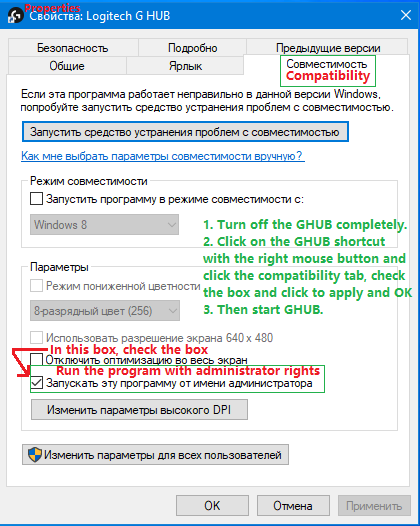
When using the Gameloop emulator and for script to work, you must run Logitech Gaming Software and GHUB with administrator rights.
 Problems that happen with Logitech and how to solve them!!!
Attention! How to Avoid a Potential Ban When Using Lua Scripts.
Problems that happen with Logitech and how to solve them!!!
Attention! How to Avoid a Potential Ban When Using Lua Scripts.
In Warface, Lua scripts for recoil control only work with the old GHUB interface. The new interface likely uses Win32 API, which is detected and blocked by anti-cheat systems. There have already been ban cases in games like StalCraft and Delta Force. The old GHUB is safer because it uses its own driver-based solution.
Download the old, stable version here:
https://drive.google.com/file/d/1ffXNTp5iQZ8woltyIj7CKkeY6Oz6ux3x/view
After installation, disable automatic updates in the settings.
Also, for safety, do not use game-specific profiles in GHUB or Logitech Gaming Software. Use a desktop profile with the persistent attribute.
GHUB must be run with administrator privileges.
Third-party programs that can use the mouse's side buttons, such as Discord, may cause issues with running the scripts, so keep this in mind.
You should also be familiar with your mouse button numbering.
________________________________________
Универсальный скрипт – No Recoil для мышек Logitech в игре CALL OF DUTY MOBILE (PC версия - использование Gameloop, или другого эмулятора) убирают вертикальную отдачу у AK47 в королевской битве, почти полностью. То есть повышают кучность и тем самым увеличивают дальность поражения противника. Ваша мышка должна поддерживаться программой - Logitech Gaming Software, или GHUB.
Скрипт был написан для АК47 без модулей с обоймой 50 патронов, под настройки чувствительности мыши в игре при стрельбе для всех прицелов - 70 (В строках скрипта: percentChangeX = 0 и percentChangeY = 0).
СКРИПТ РЕГУЛИРУЕМЫЙ!!!
Степень убирание отдачи регулируется в таких строках скрипта (цифры означают - проценты):
percentChangeX = 0 (по горизонтали)
percentChangeY = 0 (по вертикали)
Например если: percentChangeX = 100 и percentChangeY = 100 то настройки чувствительности мыши в игре надо будет поменять на 35.
Если вам надо другая чувствительность, или у вас другой LOADOUT, то вам необходимо подобрать свои значения в (percentChangeX и percentChangeY).
Если прицел при стрельбе двигается вниз, или вправо то значения отрицательные. Если вверх, или влево, то значения положительные.
Например для такого LOADOUT #1:
50-Round Mag (Large B)
Monolithic Suppressor
OWC RANGER
Ranger Foregrip
Classic Red Dot Sight
Firing sensitivity - 40
в скрипте будет так:
percentChangeX = -24
percentChangeY = -6
В настройках эмулятора должно быть выставлено: ДПИ - 320, разрешение экрана - 1920х1080.
При запущенной игре, в настройках эмулятора "BlueStacks" в параметре - "чувствительность мыши" меняете значение 0,5 на 1,0.
Если настройки чувствительности мыши в игре слишком большие для вас, или слишком маленькие, то вы можете изменить dpi своей мыши, на работу скрипта это не повлияет.
Для скрипта необходима клавиатура с наличием кнопок CapsLock и NumLock.
"CapsLock" - вкл/выкл скрипта. Нажмите на клавиатуре кнопку CapsLock, загорится значок CapsLock и скрипт включится. При повторном нажатии кнопки CapsLock выключает скрипт, значок CapsLock погаснет.
Внимание!!! Убирание отдачи этим скриптом только при нажатой правой кнопке мыши и левой кнопки мыши. Если вы правую кнопку не нажмете, то левая кнопка будет работать в своем обычном режиме.
"NumLock" - включенный на клавиатуре понижает скорострельность. В результате нет отдачи и разброса. Повторное нажатие кнопки NumLock возвращает полную скорострельность. Но, в таком режиме стрельба начнется когда вы нажмете правую кнопку мыши и левую. Стрельба прекратится когда вы отпустите правую кнопку мыши. Это связанно с тем, что клики левой кнопки написанные в скрипте не работают на левой кнопки мыши logitech.
При использовании эмулятора Gameloop и чтобы в нём работал скрипт, необходимо запускать Logitech Gaming Software и GHUB с правами администратора.
Проблемы которые бывают с Logitech и как их решить!!!
Внимание!!! Как избежать возможного бана при использование lua-скриптов.
В Warface lua-скрипты для устранения отдачи работают только в старом интерфейсе GHUB. Новый интерфейс, вероятно, использует Win32 API и поэтому блокируется анти-читом. В таких играх как: StalCraft и Delta Force уже были случаи бана.
Старый GHUB безопаснее, т.к. использует собственное решение.
Скачать старую, стабильную версию:
https://drive.google.com/file/d/1ffXNTp5iQZ8woltyIj7CKkeY6Oz6ux3x/view
После установки отключите автоматическое обновление в настройках.
Также в целях безопасности не используйте профили для игр в GHUB и Logitech Gaming Software. Используйте профиль рабочего стола с атрибутом постоянный.
Программу GHUB надо запускать с правами администратора.
Сторонние программы которые могут использовать боковые кнопки мыши, например Discord, могут вызвать проблемы с запуском работы скриптов, учтите это.
Ещё вы должны хорошо знать нумерацию кнопок мыши.