| MAIN | SHOP | VIDEO |
ОПИСАНИЕ НА РУССКОМ НИЖЕ!!!
Attention!!!
If you are unable to make a purchase, check your email. There will be a message with links to alternative stores where you can complete your purchase.
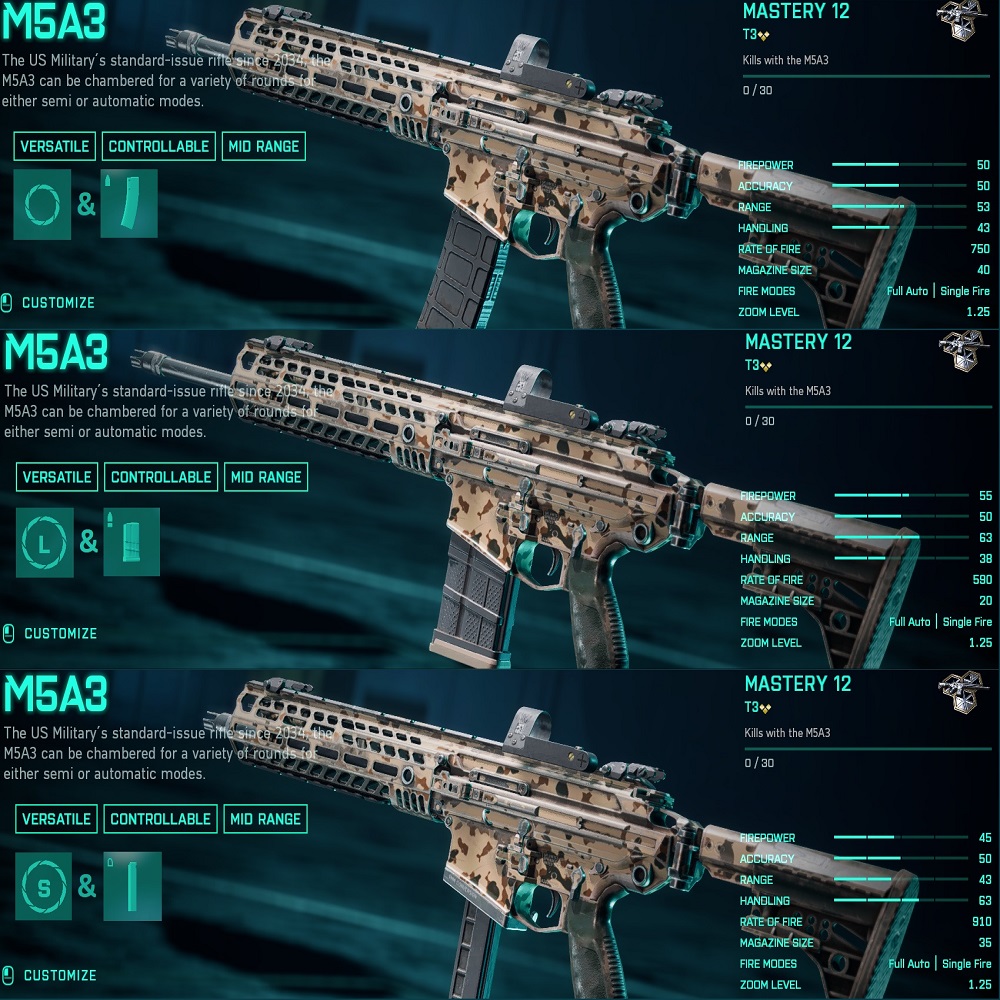
The "No recoil" script for Logitech mice in Battlefield 2042 removes most of the vertical recoil for the M5A3 with a rate of fire of 590, 750, and 910 rounds per minute, significantly improving accuracy and thereby increasing the effective range against opponents. Your mouse should be supported by the GHUB software.
The script was written for mouse sensitivity settings in the game of 10.0, for sights: 1.25x (CapsLock should be turned off) and 2.5x (CapsLock should be turned on, press the CapsLock button on the keyboard).
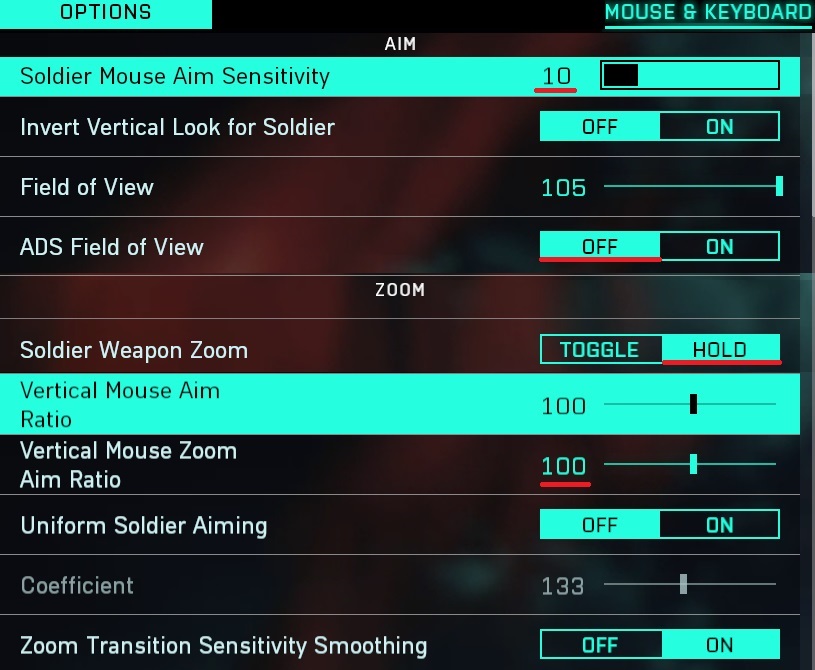 Attention!!! There is a possibility that for technical reasons ("Input Lag" - affecting the operation of macros), or if you have vertical synchronization turned off in the game, or when modifying weapons, if the sight pulls down during shooting, then reduce the values in the mouse sensitivity settings in the game, if up, then increase.
If the mouse sensitivity settings in the game are too large for you, or too small, then you can change the dpi of your mouse, this will not affect the operation of the scripts.
Script control:
1st press of the 5th mouse button - turns on the no recoil mode for M5A3 with a fire rate of 590 rounds per minute.
2nd press of the 5th mouse button - switches to M5A3 with a fire rate of 750 rounds per minute.
3rd press of the 5th mouse button - switches to M5A3 with a fire rate of 910 rounds per minute.
4th press of the 5th mouse button - turns off the script.
Further presses of the 5th mouse button will repeat the cycle.
 For convenience of using the script, there is a light indication when pressing the 5th mouse button. Your keyboard should have indicators: CapsLock, NumLock, ScrollLock.
1st press of the 5th mouse button
For convenience of using the script, there is a light indication when pressing the 5th mouse button. Your keyboard should have indicators: CapsLock, NumLock, ScrollLock.
1st press of the 5th mouse button - NumLock on the keyboard will light up.
2nd press of the 5th mouse button - NumLock will turn off and ScrollLock will light up.
3rd press of the 5th mouse button - both NumLock and ScrollLock will light up.
4th press of the 5th mouse button - both NumLock and ScrollLock will turn off.
Attention!!! Recoil reduction with this script only works when the right mouse button and left mouse button are pressed. If you don't press the right button, the left button will work in its normal mode.
Problems that happen with Logitech and how to solve them!!!
In some games, scripts may not work if you are using GHUB version 2022.3.242300 or later. If you encounter this problem, use a GHUB version earlier than 2021.3.
You can download GHUB version 2021.3 using the link below:
https://drive.google.com/file/d/1ffXNTp5iQZ8woltyIj7CKkeY6Oz6ux3x/view
After installation, immediately disable automatic updates in the GHUB settings.
Previously, when using a game profile in Logitech Gaming Software, there were cases where users received bans. The problem was resolved by using a Desktop profile with the Persistent attribute. No such issue has been observed with G HUB. However, as a precaution, I recommend using a Desktop profile with the Persistent attribute so that the scripts work in any game.
GHUB must be run with administrator privileges.
Third-party programs that can use the mouse's side buttons, such as Discord, may cause issues with running the scripts, so keep this in mind.
You should also be familiar with your mouse button numbering.
________________________________________
Скрипт – No Recoil для мышек Logitech в игре Battlefield 2042 убирает вертикальную отдачу у M5A3 с скорострельностью: 590, 750 и 910 выстрелов в минуту, почти полностью. То есть повышает кучность и тем самым увеличивают дальность поражения противника. Ваша мышка должна поддерживаться программой - GHUB.
Скрипт был написан под настройки чувствительности мыши в игре – 10.0, под прицелы: 1.25x (CapsLock – должен быть выключен) и 2.5x (CapsLock – надо включить, нажмите на клавиатуре кнопку CapsLock).
Внимание!!! Есть вероятность, что по техническим причинам ("Input Lag" - влияющий на работу макросов), или если у вас выключена вертикальная синхронизация в игре, или при модифицировании оружия, если прицел во время стрельбы тянет вниз, то уменьшаете значения в настройках чувствительности мыши в игре, если вверх, то увеличиваете.
Если настройки чувствительности мыши в игре слишком большие для вас, или слишком маленькие, то вы можете изменить dpi своей мыши, на работу скрипта это не повлияет.
Управление скриптом:
1-е нажатие на 5-ю кнопку мыши – включение режима убирания отдачи для М5А3 с скорострельностью 590 выстрелов в минуту.
2-е нажатие на 5-ю кнопку мыши – переключение на М5А3 с скорострельностью 750 выстрелов в минуту.
3-е нажатие на 5-ю кнопку мыши – переключение на М5А3 с скорострельностью 910 выстрелов в минуту.
4-е нажатие на 5-ю кнопку мыши – выключит скрипт.
Дальнейшие нажатия на 5-ю кнопку мыши повторят цикл.
Для удобства использования скрипта есть световая индикация при нажатии 5-й кнопки мыши. На вашей клавиатуре должны быть индикаторы: CapsLock, NumLock, ScrollLock.
1-е нажатии на 5-ю кнопку мыши – загорится NumLock на клавиатуре.
2-е нажатие на 5-ю кнопку мыши – NumLock погаснет и загорится ScrollLock.
3-е нажатие на 5-ю кнопку мыши – NumLock и ScrollLock будут гореть.
4-е нажатие на 5-ю кнопку мыши – погасит NumLock и ScrollLock.
Внимание!!! Убирание отдачи этим скриптом только при нажатой правой кнопке мыши и левой кнопки мыши. Если вы правую кнопку не нажмете, то левая кнопка будет работать в своем обычном режиме.
Проблемы которые бывают с Logitech и как их решить!!!
В некоторых играх скрипты могут не работать, если вы используете GHUB версии 2022.3.242300 и выше. В случае в возникновении такой проблемы, то используйте GHUB до версии 2021.3
Скачать версию 2021.3 можете по ссылке:
https://drive.google.com/file/d/1ffXNTp5iQZ8woltyIj7CKkeY6Oz6ux3x/view
После установки сразу отключите автоматическое обновление в настройках.
Раньше, если в Logitech Gaming Software использовали игровой профиль, то были случаи бана. Проблема решалась с использованием профиля рабочего стола, с атрибутом - постоянный. Такой проблемы в GHUB замечено не было. Но, на всякий случай рекомендую использовать профиль рабочего стола, с атрибутом - постоянный, чтобы скрипты работали в любой игре.
Программу GHUB надо запускать с правами администратора.
Сторонние программы которые могут использовать боковые кнопки мыши, например Discord, могут вызвать проблемы с запуском работы скриптов, учтите это.
Ещё вы должны хорошо знать нумерацию кнопок мыши.